Everything you need to use the Truck Bans app: what each screen does, step-by-step how-to, and fixes for common issues. Screenshots show exactly where to find each feature.
Truck Bans (package eu.nakordoni.truckban, also known as truckbans.com) is a free Android app that shows truck/HGV driving restrictions across EU countries plus Germany and Ukraine specifics. It covers weekend, public-holiday and seasonal bans, Germany's Ferienreiseverordnung with a live road map, and Ukraine's heat-based truck ban. Data comes from nakordoni.eu.
No. Truck Bans is an independent, unofficial information tool built by nakordoni.eu using publicly available and official traffic-restriction sources. The Ukraine heat ban is explicitly a forecast-based estimate you should verify with the local road service before relying on it.
The app covers restriction data for the EU/neighboring countries in nakordoni's truck-ban database (e.g. Germany, Poland, Austria, Switzerland, Czechia, France, Hungary, Italy, Slovakia, Slovenia, Croatia, Romania, Bulgaria, Greece, Ukraine, and others), each shown with its own timezone-aware active/upcoming ban schedule. You can narrow the app to just the countries you drive via the 'Countries I drive' filter in the menu.
No — the app is fully usable without linking an account; the drawer shows 'Not linked' / Guest tier by default. Linking is optional and only adds cross-app sync of your preferences and, for some features like ban-check quotas, tier-based limits.
In the drawer's Legal section, tap 'Privacy Policy' or 'Terms of Service' — both open the corresponding nakordoni.eu policy page inside the app's web viewer.
It opens nakordoni.eu, the parent site that also tracks live border crossing wait times, in your external browser — useful if you want the broader border-crossing picture beyond just truck bans.
The app is not documented as using continuous GPS/location tracking for its core ban features — bans are shown per-country/region you select manually (via the country filter), not via live GPS positioning. For privacy specifics, refer to the in-app Privacy Policy page.
The app is aimed at truck drivers, dispatchers, and fleet planners who need to check whether a route is legally drivable at a given date and time under weekend, holiday, night, seasonal, or heat-related truck driving restrictions.
Yes, Truck Bans is free to download and use. The app contains ads.
The app's listing states support for more than 20 languages, with version 1.6.6 having fully translated all interface screens.
Use Truck Bans for planning and monitoring restrictions, but verify critical routing and compliance decisions with the official national road authority before you drive, especially for time-sensitive or high-value trips.
The app helps with planning, but before authorizing a commercial trip, validate the legal restrictions, exemptions, and any route-specific signs or notices with official sources — don't base a dispatch decision solely on the app.
Yes. Weather, holidays, roadworks, enforcement instructions, and exceptional events can all change restrictions with little advance warning. Check the News tab for recent updates and confirm anything time-sensitive with the official road authority before you travel.
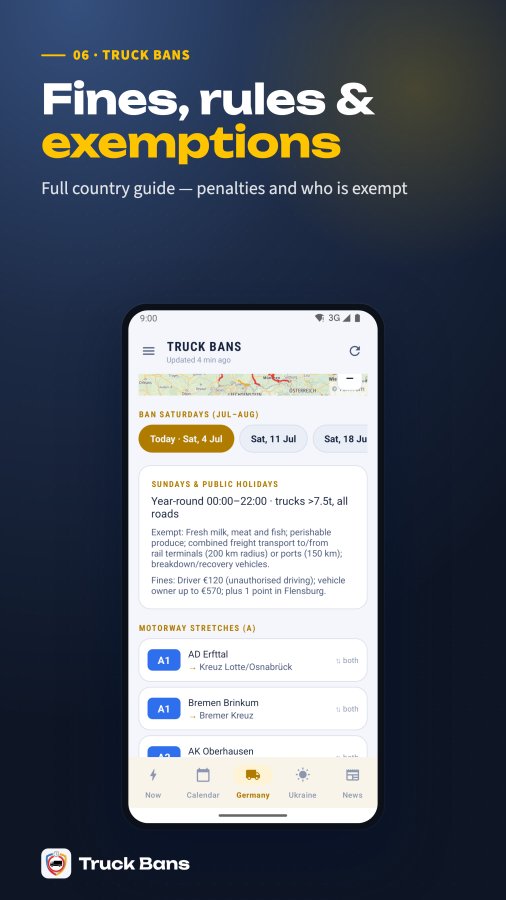
The Germany tab shows the Ferienreiseverordnung (summer holiday travel regulation): Saturday bans in July-August for trucks over 7.5t on listed motorway (A) and federal road (B) stretches, both directions, plus the year-round Sunday and public-holiday ban (00:00-22:00, trucks over 7.5t, all roads) with exemptions and fines. It also shows the next ban date with a live countdown.
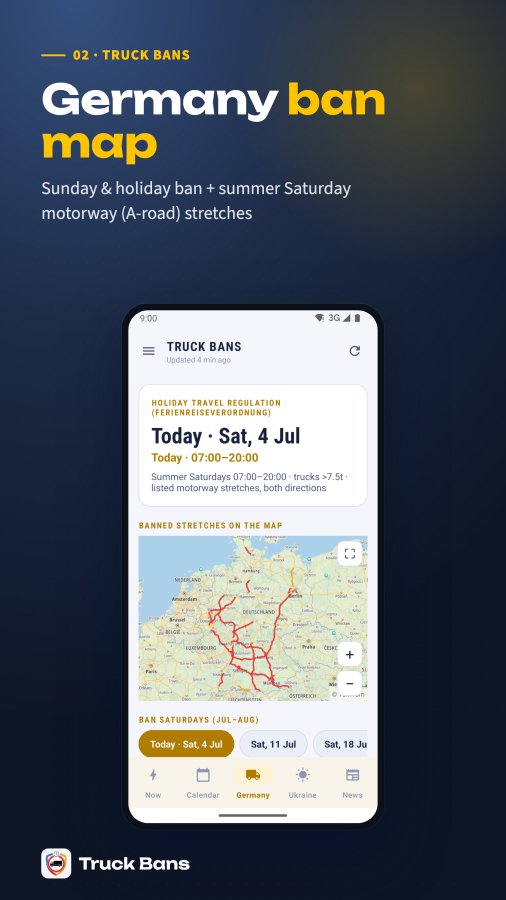
Below the Germany rules, a live TomTom traffic map shows every currently-banned motorway (red) and federal-road (yellow) stretch. Tap any line or its list row to zoom in on just that stretch with start/end pins; tap the chip again (or the X) to return to the full overview. There's a fullscreen button and pinch-zoom/pan; the map switches to a dark style automatically at night.
It's a truck restriction that applies when the forecast air temperature exceeds +28C: trucks over 24 tonnes (or over 7 tonnes per axle) are banned from state-significance roads between 10:00 and 22:00 Kyiv time. The Ukraine tab shows this status per oblast (region), with the count of oblasts currently affected.
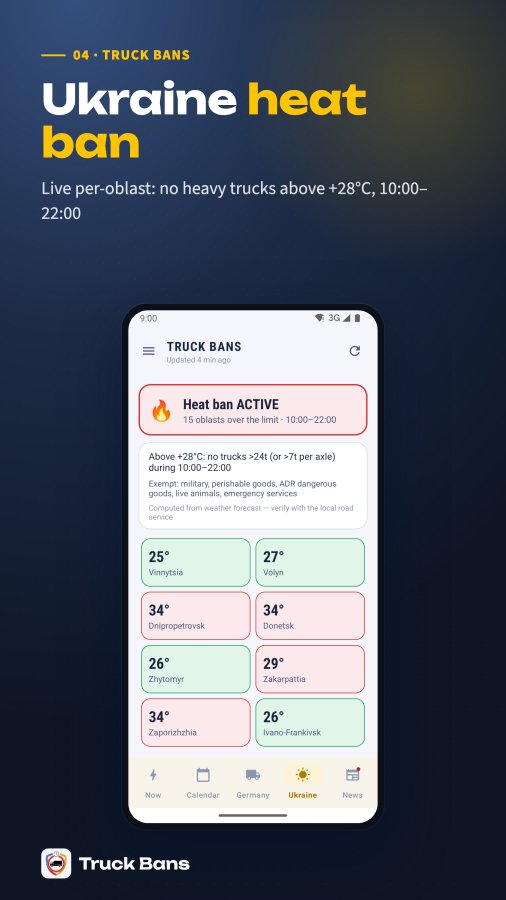
Common exemptions include military vehicles, perishable-goods transport, ADR dangerous-goods vehicles, live-animal transport, and emergency services — shown as tags on the Ukraine tab. Exact exemptions can vary by regional order, so check the linked source if your cargo type isn't listed.
The heat ban applies to trucks with actual mass over 24 tonnes, OR with an axle load over 7 tonnes — either condition triggers it. It only applies when the forecast temperature is strictly above +28C, during the 10:00-22:00 window Kyiv time.
Each alert choice subscribes your device to a Firebase Cloud Messaging topic like tb_DE_2h (country + timing option). A server job checks the ban schedule every 15 minutes and pushes to the matching topic at the right local time for that country. This is free and unlimited.
Tapping 'Read more' on a supported country opens a fully native detail screen (not a web page) with a status banner, quick-answer summary, a dated ban calendar (up to 30 days, expandable), detailed rules/regimes, public holidays, seasonal bans, affected roads, exemptions, fines, an FAQ section, and official sources — mirroring the country's web guide on nakordoni.eu but rendered natively for offline-friendly speed.
Only countries with a native content guide (a 'slug' in the app's data) get the fully native detail screen; countries without one — like Ukraine, which has its own dedicated tab — fall back to opening the equivalent page on nakordoni.eu inside the in-app web viewer.
'Ask' opens nakordoni's AI assistant inside the app's own web view (not an external browser), pre-filled with a truck-ban question for the relevant country and your app language, so you can ask follow-up questions about a specific restriction without leaving the app.
This is AuthNak — a free, account-less identity system shared across Nakordoni apps. Linking gives you an NKD-XXXX-XXXX code you can enter in other Nakordoni apps or the website to sync your followed countries, vehicle info, and settings. You can create a new one or enter an existing code from the 'Nakordoni account' menu item.
Linked accounts have a tier (Guest, Basic, or Pro) with a daily ban-check quota shown as 'X/Y checks today.' This quota is soft — it never blocks you from seeing ban data, it just tracks usage against your tier and is used to potentially unlock higher tiers via promo codes.
Yes — both the Germany tab (Sunday/holiday ban card) and native country detail pages include a 'Fines and penalties' section describing consequences for violating that country's restriction, sourced from the same country_info data as the rest of the rules.
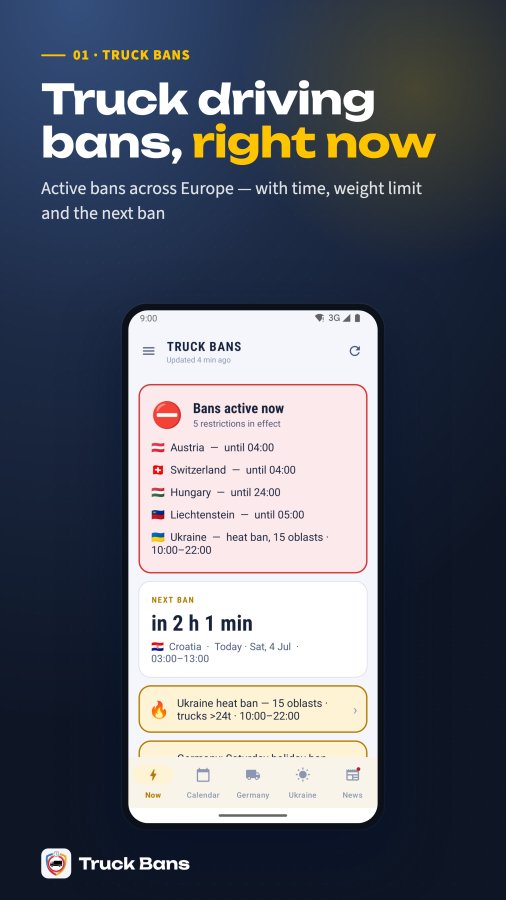
'Active now' bans are computed server-side using each country's own local timezone (e.g. Germany bans checked against Europe/Berlin time), comparing the current moment against that ban's date and time window. This means a ban can show as active in one country and not another even at the same UTC moment, depending on local time zones.
Yes — the Germany tab lists every banned motorway (A-road) and federal road (B-road) stretch with its start/end points and direction, and you can tap any entry to zoom the map to just that stretch.
During the summer Ferienreiseverordnung season, the Now tab surfaces a Germany banner when a Saturday ban is imminent (within roughly the next couple of days), showing the ban hours and weight threshold (over 7.5t) so you don't have to switch tabs to notice it.
No stated limit — you can enable bell alerts independently for as many countries as you like; each country has its own alert preferences sheet and its own set of FCM topic subscriptions.
Per the app's listing, Germany's Sunday and public-holiday truck ban runs from 00:00 to 22:00 for trucks above 7.5 tonnes, under paragraph 30 of the StVO (German road traffic regulation). As with all restrictions, verify the specific route, cargo, and any exemptions against the official source before relying on it.
According to the app's listing, the German summer Saturday restriction runs from July 1 through August 31, 07:00 to 20:00, and applies only to specific affected Autobahn stretches shown on the in-app map rather than to all roads.
Open the Now tab — it shows every ban currently active right now (evaluated in each country's own local timezone), plus the next upcoming ban and a 48-hour outlook. Tap a country card to open its action grid or the native country-detail page for full rules.
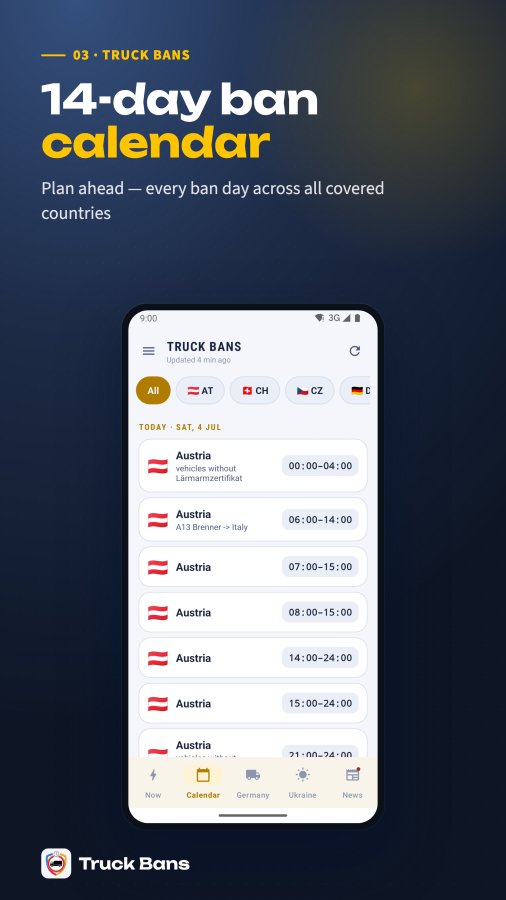
Use the Calendar tab, which lists every ban day for the next 14 days across countries, or open a country's detail page which shows up to 30 days (with a 'Show all' option beyond the first preview). Each entry shows the date, time window, and restriction type.
Tap the bell icon in a country's action grid (or on its detail page) to open the alert preferences sheet. Choose when you want to be warned — 4h/3h/2h/1h before a ban starts, when the ban begins, and/or when the road clears again — then tap 'Save alerts'. Alerts are free and unlimited.
You don't need to manually sign up — saving any alert option automatically creates a free, anonymous device identity (an NKD code) in the background if you don't have one yet, so your preferences can sync to the server that schedules pushes. You never have to enter an email or password for this.
Yes — the bell preferences sheet includes a 'When the road is clear again' option in addition to the 4h/3h/2h/1h-before and 'When a ban starts' options. Toggle it on and save.
If you uncheck every option and save, the app unsubscribes you from that country's FCM topics and shows 'Alerts turned off for <country>.' Your preference row on the server is deactivated (not deleted) so history is kept, but you'll receive no more pushes for that country until you turn options back on.
Open a country's Calendar action (from the action grid or its detail page) and tap 'Save to my calendar'. The app builds an .ics file on-device from its own cached ban data and hands it to your calendar app to import — this works even offline if the data was already loaded.
Yes, two ways: 'Share calendar' sends the .ics file plus a link to truckbans.com/s/<country>; 'Share calendar image' downloads and shares the same visual calendar card the website generates (as a PNG), in your app language with English as fallback. Ukraine has no generated image card, so image-sharing isn't available for it.
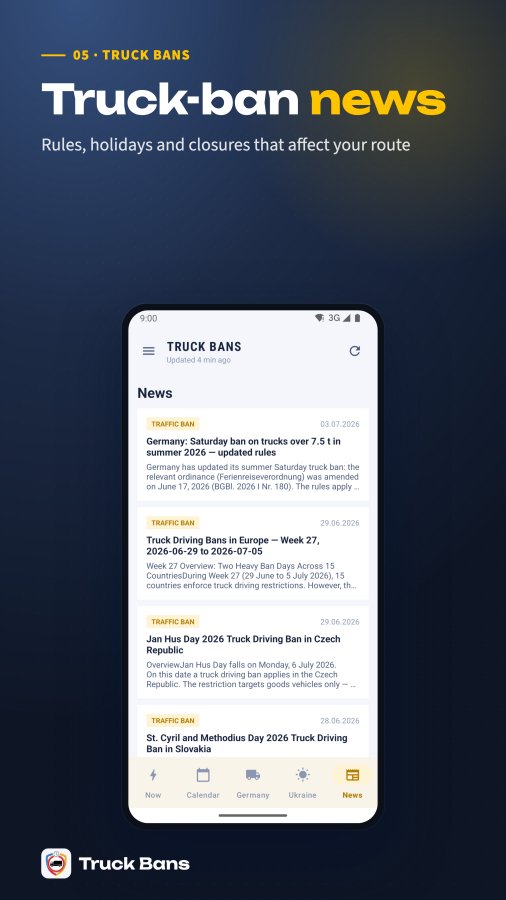
The News tab lists recent truck-ban related news items (new rules, holidays, road closures) fetched from the server, each with a title, summary, date and category. A red badge appears on the News tab icon whenever there's an unread item newer than the last one you viewed.
Tap 'Mark all as read' at the top of the News tab (shown only when there's something unread) — this records the current time as your 'last seen' point, so items published before it no longer count as unread and the tab badge clears. Simply opening the News tab also clears the badge.
Yes — the country detail page's calendar image can be opened fullscreen (with close/download/share controls), and the download saves the PNG to your phone's Pictures/TruckBans folder ('Saved to Photos'). If the save fails, you'll see 'Couldn't save the image'.
Open the action grid for a country (or its detail page) and tap 'Opinion'. Write a short comment (minimum 3 characters, up to 500) and optionally tap 1-5 stars, then hit Submit — it posts to the server tied to that country. You'll see 'Opinion submitted!' on success or an error toast if it fails to send.
Tap Share in a country's action grid to send a link like truckbans.com/s/<country-code> via the system share sheet. Anyone who opens that link — including someone installing the app for the first time via that link — lands focused on that specific country's ban info automatically.
Open the menu (drawer) and tap 'Language' to pick from 24 supported languages (including Ukrainian, English, Polish, German, Russian, Romanian, Hungarian, and more). Changing it re-fetches all ban data in the new language immediately.
In the drawer menu, tap 'Theme' and choose Day, Night, or Auto (follows your system setting). The map on the Germany tab also automatically switches to a dark tile style at night.
In the drawer, tap 'Countries I drive' (or 'Show bans in' filter) to choose: All countries, a custom list of countries you select, just your home country, or your home country plus its neighbours. This filter narrows the Now tab, Calendar, and banners across the app.
On first launch, the app shows a short guided tour highlighting the Now, Calendar, Germany, Ukraine and News tabs plus the menu, with 'Skip' and 'Next' controls. You can replay it any time via 'App tour' in the drawer menu.
You can rate via 'Rate app' in the drawer, or the app will prompt you automatically (from your 2nd session onward, at most once a day, never again once you've rated). Tapping 1-5 stars records your rating; 4-5 stars leads you to leave a Google Play review, while 1-3 stars offers to send feedback directly instead of going to the Store.
In the drawer, tap 'Vehicle' to choose a type (HGV/Truck, Truck + trailer, Van/LGV, or Bus) and enter your max weight in tonnes. This is saved locally (and synced if you're linked to an NKD account) but is informational — displayed in the drawer summary rather than filtering which bans are shown.
In the drawer, under Legal, tap 'Delete my data'. This clears all locally stored settings, your country filter, and cached ban data on this device — it does not affect any server-side account unless you also unlink your NKD code. This action cannot be undone and restarts the app fresh.
Open the drawer, tap 'Nakordoni account', and choose 'Unlink' in the dialog. This detaches the NKD code from this device's local prefs; the account itself isn't deleted and you can re-link the same code later by entering it again.
Use 'Support' or 'Contact' in the drawer's Information section — both open nakordoni.eu's contact/AI-assistant page inside the app so you can describe your issue without leaving the app.
The app checks Google Play for updates on launch and, if one's available, downloads it in the background (a 'flexible' update) without interrupting your use. When ready, a banner reading 'Update downloaded' with a 'Restart' button appears — tap it to apply the update immediately, or it will apply automatically next time you fully close and reopen the app.
Google Play's data-safety section for the app lists location as a type of data it may collect. Check the in-app privacy policy for exactly which feature uses it and whether it's optional before granting the permission.
The map needs an internet connection — tiles are fetched live from nakordoni.eu's TomTom proxy, so they aren't cached for offline use. If tiles don't appear, check your connection and pull to refresh the tab; the map also resets when you switch in/out of fullscreen, which can help if it froze.
The heat-ban status is computed by the app's server from a weather forecast (temperature per oblast vs. the +28C threshold), not from an official live feed — the app explicitly labels it 'Computed from weather forecast — verify with the local road service.' Treat it as a planning aid and confirm with Ukravtodor/the local road service before relying on it operationally.
Three common causes: (1) Android notification permission wasn't granted — the app requests it the first time you turn on any alert option, so check Settings > Apps > Truck Bans > Notifications is allowed; (2) you saved the bell preferences but no options were actually checked; (3) the alert only fires within a set trigger window (the server checks every 15 minutes and only fires a given ban+option once), so very last-minute or already-passed triggers won't retroactively notify you. Re-open the bell sheet and re-save if you're unsure it saved.
If there's no calendar app registered to handle .ics files on your phone, the save button falls back to opening the share sheet instead so you can send the file to a calendar app or email it to yourself. Also check there are actually upcoming bans for that country — 'No upcoming bans to save' means the .ics can't be built because there's nothing to add.
The opinion text needs at least 3 characters — 'Please write a bit more (at least 3 chars)' means your comment was too short. 'Failed to send, please try again' means the request couldn't reach the server (usually a connectivity issue), so check your internet and retry.
The app reads the Play Store install referrer once, right after first launch, to detect a shared country and focus on it — this can take a moment or occasionally miss if the referrer data wasn't passed through cleanly. Reopening the original share link (App Link) directly in the app after install will reliably focus that country.
Yes — the app caches the last successfully fetched data payload locally and shows it with an 'Offline — showing saved data' notice if a refresh fails. If you open the app for the very first time with no connection at all, you'll see 'No connection — data not loaded yet' since there's nothing cached yet. Cached data is considered stale after 30 minutes and auto-refreshes next time you're online.
Certain in-app web pages (like policy pages, contact form, or country pages without a native guide) use a built-in browser view. If your connection drops, it shows a friendly 'No internet connection — Please check your connection and try again' screen with a Try again button, instead of a raw browser error page.
Tap the refresh icon in the top bar to force an update, or check the 'Updated X min/h ago' label under the header. The app also auto-refreshes if the cached data is more than 30 minutes old whenever you resume the app, and refetches automatically if you change language (since data is localized).
If you deny the Android notification permission prompt, your alert preferences are still saved and topic subscriptions still happen, but you won't actually see any push notifications on your device until you manually grant the Notifications permission for the app in Android system settings.
Not necessarily. Whether a restriction applies depends on the country, date, time, vehicle weight, specific road, cargo type, and any exemptions. Open the country's rule details in the app and verify against the official source before assuming a ban does or doesn't apply to your truck.
No, this varies by country and specific regulation. Don't assume an empty run is automatically exempt — check the exemptions listed for that country in the app and verify with the official source before relying on it.
The app includes an in-app 'Delete my data' option (in the drawer) that clears locally stored settings and cached data on your device. For anything stored server-side, or if you have questions about the Google Play data-safety listing, contact ads@nakordoni.eu.
First refresh the app and cross-check with the official road authority for that country. You can also leave an in-app opinion on the restriction, or email ads@nakordoni.eu with the country, route, restriction, the time, a screenshot, and what you observed so the team can investigate.
This guide mirrors the in-app assistant. Still stuck? Ask the assistant inside the app (Menu → Support) or email ads@nakordoni.eu. Truck Bans is an unofficial information service — for legally critical decisions, verify with the official authorities.
