
API Documentation
REST + JSON over HTTPS. One base URL, one key, predictable envelopes.
| Base URL | https://nakordoni.eu/api/v1/data/ |
|---|---|
| Format | JSON, UTF-8 |
| Auth | Authorization: Bearer NKD-DEV-… |
| Versioning | Path-versioned & per-endpoint: /api/v1/… is stable and its responses never change. A higher version path (/api/v2/…, /api/v4/…) serves the newer behaviour only for the endpoints that changed, and transparently falls back for the rest. Each product shows the highest version it documents — target that, not this note. If a newer version supersedes the one your key is calling, we email you and show a notice in the developer portal — you never have to discover it from a changelog. |
On this page
Authentication
Every request needs your API key in the Authorization header (recommended) or as a ?key= parameter.
curl "https://nakordoni.eu/api/v1/data/queue?ppid=id_13" \
  -H "Authorization: Bearer NKD-DEV-XXXX-XXXX-XXXX"
Response envelope
{
  "ok": true,
  "api_version": "v1",
  "product": "queue",
  "attribution": "Data by nakordoni.eu",
  "terms": "https://nakordoni.eu/en/p/developer_api_terms",
  "data": { ... },
  "usage": { "limit": 1000, "used": 42, "reset": "2026-06-06T00:00:00Z" }
}
Errors return ok:false with error.code (missing_api_key, invalid_api_key, qps_exceeded, quota_exceeded, unknown_product, product_unavailable, not_approved, bad_request, duplicate_request, market_not_allowed, internal_error, status_unavailable, timeout) and HTTP status 400/401/403/404/429/500/503/504. Rate-limit headers X-Devapi-Limit and X-Devapi-Remaining are sent on every metered response. ok:false is authoritative — never inspect data on a failed call. The usage object is present on every metered product; /status is public and unmetered, so it returns no usage.
Quotas
| Explorer | |
|---|---|
| calls/day on standard data APIs | 1,000 |
| calls/day on forecast & statistics APIs | 200 |
| truck-route calls/day | 10 |
| QPS | 2 |
Daily counters reset at midnight UTC. You get an email at 80% and 100% of quota.
Paid plans raise every one of these limits. See the current plans and their allowances: Plans
Code samples
curl
curl "https://nakordoni.eu/api/v1/data/queue?ppid=id_13" \
  -H "Authorization: Bearer $NKD_API_KEY"
JavaScript (fetch)
const res = await fetch('https://nakordoni.eu/api/v1/data/forecast?ppid=id_13&prediction_steps=24', {
  headers: { Authorization: `Bearer ${process.env.NKD_API_KEY}` }
});
const { ok, data, error, usage } = await res.json();
if (!ok) throw new Error(error?.code ?? res.status);
console.log(`forecast points: ${data.length}, calls left today: ${usage.limit - usage.used}`);
Python (requests)
import os, requests

r = requests.get(
    "https://nakordoni.eu/api/v1/data/stats",
    params={"ppid": "id_15", "compare": 1},
    headers={"Authorization": f"Bearer {os.environ['NKD_API_KEY']}"},
    timeout=15,
)
payload = r.json()
print(payload["data"]["daily"], payload["usage"])
Excel (Power Query)
Pull live queue, forecast or truck-ban data straight into a workbook with Power Query's built-in JSON connector — no code, refreshable on a schedule. The same Headers pattern works for every product in this API; just change the URL.
Data → Get Data → From Other Sources → Blank Query, then Home → Advanced Editor and paste:
let
    ApiKey = "NKD-DEV-XXXX-XXXX-XXXX",
    Source = Json.Document(Web.Contents("https://nakordoni.eu/api/v1/data/queue",
        [Query = [ppid = "id_13"], Headers = [Authorization = "Bearer " & ApiKey]])),
    data = Source[data],
    AsTable = Record.ToTable(data)
in
    AsTable
Keep the API key inside the M query (Home → Advanced Editor), not in a worksheet cell — Power Query blocks a web request built from another query or cell ("Formula.Firewall") unless its privacy level is set to Organizational.
Multiple checkpoints in one table (fleet dashboards) — e.g. every truck crossing UA→PL (crossing_type=9; in v3 that one code covers both freight lanes):
let
    ApiKey = "NKD-DEV-XXXX-XXXX-XXXX",
    Source = Json.Document(Web.Contents("https://nakordoni.eu/api/v4/data/border/1/2/9",
        [Headers = [Authorization = "Bearer " & ApiKey]])),
    checkpoints = Source[data],
    AsTable = Table.FromRecords(checkpoints)
in
    AsTable
Data → Refresh All in Excel, or a scheduled refresh in Power BI / Excel Online, keeps the numbers current — no polling code needed.
ERP integration (BAS / BAF and 1C-family platforms)
BAS / BAF and other 1C-family platforms can call this API directly from a scheduled job — HTTPConnection plus ReadJSON, no middleware, no extra service to host. The most common setup keeps an information register of EU fuel prices up to date.
Refreshing an information register (fuel prices, all countries in one call)
// Scheduled job — runs once a day
Connection = New HTTPConnection("nakordoni.eu", 443, , , , 30, New OpenSSLSecureConnection);

Headers = New Map;
Headers.Insert("Authorization", "Bearer NKD-DEV-XXXX-XXXX-XXXX");

Request  = New HTTPRequest("/api/v1/data/fuel", Headers);
Response = Connection.Get(Request);

Reader = New JSONReader;
Reader.SetString(Response.GetBodyAsString("UTF-8"));
Answer = ReadJSON(Reader, True);
Reader.Close();

If Answer["ok"] <> True Then
    // Answer["error"]["code"] says why; Answer["usage"] holds your quota state
    Return;
EndIf;

For Each Row In Answer["data"] Do
    Record = InformationRegisters.FuelPrices.CreateRecordManager();
    Record.Period   = CurrentSessionDate();
    Record.Country  = Row["country"];    // "PL", "DE", "SK", "RO", ...
    Record.Diesel   = Row["diesel"];
    Record.Petrol   = Row["petrol"];
    Record.LPG      = Row["lpg"];
    Record.Currency = Row["currency"];
    Record.Write();
EndDo;
Three things to get right: pass New OpenSSLSecureConnection on port 443 or the request dies on TLS; call /api/v1/data/fuel without a country parameter so one request returns every country instead of one call per country; and test ok before touching data — failures come back as ok:false with an error.code, not as an exception. The sample uses the platform English keyword set; the localized equivalents (HTTPСоединение, ПрочитатьJSON, РегистрыСведений) behave identically.
Fuel prices upstream move once a day, so a daily or twice-daily scheduled job is enough and stays far inside the free Explorer quota. Live queue data (queue, multi, border) changes every few minutes — poll those on their own schedule, and use multi to read up to 5 checkpoints in a single request instead of looping.
MCP Server
Prefer tool-calling over REST? We run a real MCP server (Streamable HTTP transport) exposing a safe read-only subset of this API as MCP tools — same API key, same quota, just a different transport.
Endpoint: https://nakordoni.eu/mcp · Server card: /.well-known/mcp/server-card.json
get_api_status      — no key required
list_checkpoints     — country, lang
get_border_queue     — origin, destination, crossing_type, lang
get_live_queue       — ppid, lang
get_queue_forecast   — ppid, prediction_steps
Client config (Claude Desktop / Claude Code):
{
  "mcpServers": {
    "nakordoni": {
      "url": "https://nakordoni.eu/mcp",
      "headers": { "Authorization": "Bearer NKD-DEV-XXXX-XXXX-XXXX" }
    }
  }
}
OAuth for integrations (Home Assistant and others)
Integrations whose users each need their own key (Home Assistant custom integrations, desktop and mobile apps) can let the user sign in instead of pasting a key. The flow is OAuth 2.0 authorization code for public clients with PKCE (S256) — there is no client secret. The access token we return is the user's own NKD-DEV key, which you then send as a Bearer header exactly as today.
Clients are not self-service: apply on the Integrations page, we review each integration by hand and issue a client ID with its allowed redirect URIs. Keys issued through an approved client are activated instantly for the markets approved for that integration. Apply for an integration client →
GET https://api.nakordoni.dev/oauth/authorize | response_type=code, client_id, redirect_uri (must match a registered URI exactly), state, code_challenge, code_challenge_method=S256 |
POST https://api.nakordoni.dev/oauth/token | grant_type=authorization_code, code, code_verifier, redirect_uri, client_id — or grant_type=refresh_token, refresh_token, client_id |
POST https://api.nakordoni.dev/oauth/revoke | token (refresh token, or the key itself), client_id |
- The authorization code is valid for 60 seconds, single use, and bound to the client, the user, the redirect URI and the PKCE challenge.
- The key is returned only in the token response body (access_token) — never in a URL. Store it like a password.
- expires_in is 30 days; a refresh returns the same key while it is active. If the user revokes or regenerates the key, refresh fails with invalid_grant and API calls return 401 — start re-authentication.
- Requests are rate-limited per IP and capped per client per day; errors follow RFC 6749 (error, error_description).
- Each user gets at most their own country allowance: when your integration lists more countries than the user has free, the user picks them on the consent page (pass markets=DE,AT on /oauth/authorize to pre-select). Both token responses also return markets_approved (the user's approved countries), markets_allowed (their allowance; null = unlimited), markets_available (your countries they do not have yet) and upgrade_url (where they add Extra countries).
curl -X POST https://api.nakordoni.dev/oauth/token \
  -d grant_type=authorization_code -d client_id=nkd_xxxxxxxxxxxxxxxxxxxxxxxx \
  -d code=CODE -d code_verifier=VERIFIER \
  -d redirect_uri=https://my.home-assistant.io/redirect/oauth

{"access_token":"NKD-DEV-XXXX-XXXX-XXXX","token_type":"Bearer","expires_in":2592000,
 "refresh_token":"nkdrt_…","scope":"data","markets_approved":["DE"]}
Home Assistant
Use config_entry_oauth2_flow with LocalOAuth2ImplementationWithPkce (client_secret empty) and the redirect URI https://my.home-assistant.io/redirect/oauth, which is pre-registered for Home Assistant clients. Read the key from entry.data["token"]["access_token"] and keep calling the API with Authorization: Bearer. On a 401 from the API raise ConfigEntryAuthFailed so Home Assistant offers re-authentication.
from homeassistant.helpers import config_entry_oauth2_flow

impl = config_entry_oauth2_flow.LocalOAuth2ImplementationWithPkce(
    hass, DOMAIN, client_id="nkd_xxxxxxxxxxxxxxxxxxxxxxxx",
    authorize_url="https://api.nakordoni.dev/oauth/authorize",
    token_url="https://api.nakordoni.dev/oauth/token",
)
config_entry_oauth2_flow.async_register_implementation(hass, DOMAIN, impl)
Integrations: show remaining limits
GET /api/v2/account/usage — What is left of your limits right now, for the key you call with: plan, per-second cap, and for each daily quota class (cheap, heavy, route) the limit, used, remaining and reset time (midnight UTC); also your countries as this key sees them and where to upgrade. Not metered, 30 calls per minute per key.
Integration (OAuth) keys may always call GET /api/v2/account/usage, whatever products their integration allows. Its numbers match the X-Devapi-Limit and X-Devapi-Remaining headers; X-Devapi-Reset gives the reset time as a Unix timestamp.
{"ok":true,"api_version":"v2","product":"account-usage","data":{
 "plan":{"slug":"explorer","name":"Explorer"},"qps":2,
 "quotas":{"cheap":{"limit":1000,"used":42,"remaining":958,"reset_at":"2026-10-17T00:00:00Z"},"heavy":{…},"route":{…}},
 "markets":{"approved":["DE"],"allowed":1,"available":["AT"],"key_bound":true},
 "pass":{"active":true,"expires_at":"2026-10-19T14:05:00Z","days_left":3},"upgrade_url":"https://nakordoni.eu/en/developers/billing",
 "pass_url":"https://nakordoni.eu/en/developers/billing?section=trip-pass#trip-pass"}}
When a limit is reached, the error says where to go: 429 quota_exceeded also returns error.reset_at (midnight UTC) and error.upgrade_url; 403 market_not_allowed and 403 integration_product_not_allowed return error.upgrade_url. Integration keys also get error.pass_url (Trip Pass, below).
Home Assistant: poll /account/usage at most every 15 minutes and expose a "calls left" sensor from quotas.cheap.remaining. Between polls, read X-Devapi-Remaining from your normal calls. On 429 quota_exceeded or 403 market_not_allowed, create a repair issue that links to error.upgrade_url and pause calls until reset_at.
Trip Pass
Integration users can buy a Trip Pass (1, 3, 7 or 14 days, one-off payment) on the Billing page. While it is active, the integration key gets every country the integration offers, more truck-route and data calls per day and a higher rate; the integration's products, forecast limits and data delay do not change. Developer keys of the same account are never lifted.
For integration keys, account/usage returns pass: {active, expires_at, days_left} and pass_url (the Trip Pass section of the Billing page); 429 quota_exceeded and 403 market_not_allowed / integration_product_not_allowed carry the same error.pass_url. For other keys both are null.
Country and vehicle-type codes
Border endpoints address countries and vehicle types by numeric id: /api/v1/data/border/{origin}/{destination}/{crossing_type}. destination also accepts a comma-separated list or the word all. The ids are stable and are the same in every product that takes an origin, a destination or a crossing_type.
Country ids
The border products accept the ids marked as origins below; the neighbours column is what destination=all expands to for that origin. Ids without neighbours are countries we name in responses but hold no crossings for yet. The Checkpoints Directory returns the origin, destination and crossing_type of every crossing we actually serve, so it stays the authoritative list.
| id | Country | Borders with (destination ids) |
|---|---|---|
1 |
Ukraine | 2, 3, 4, 5, 6, 7 |
2 |
Poland | 1, 7, 18 |
3 |
Slovakia | 1 |
4 |
Hungary | 1, 5, 13 |
5 |
Romania | 1, 4, 6, 12, 13 |
6 |
Moldova | 1, 5 |
7 |
Belarus | 1, 2, 8, 9 |
8 |
Lithuania | 7 |
9 |
Latvia | 7 |
11 |
Slovenia | 16, 20 |
12 |
Bulgaria | 5, 13, 14, 15, 19 |
13 |
Serbia | 4, 5, 12, 15, 16, 17, 22, 23 |
14 |
Turkey | 12, 19 |
15 |
North Macedonia | 12, 13, 19, 21, 23 |
16 |
Croatia | 11, 13, 17, 22 |
17 |
Bosnia and Herzegovina | 13, 16, 22 |
18 |
Germany | 2 |
19 |
Greece | 12, 14, 15, 21 |
20 |
Italy | 11 |
21 |
Albania | 15, 19, 22, 23 |
22 |
Montenegro | 13, 16, 17, 21, 23 |
23 |
Kosovo | 13, 15, 21, 22 |
24 |
Austria | — |
25 |
Czechia | — |
26 |
France | — |
27 |
Spain | — |
28 |
United Kingdom | — |
29 |
Netherlands | — |
30 |
Belgium | — |
31 |
Portugal | — |
33 |
Estonia | — |
34 |
Switzerland | — |
35 |
Denmark | — |
36 |
Finland | — |
37 |
Luxembourg | — |
38 |
Norway | — |
39 |
Sweden | — |
Vehicle types (crossing_type)
| id | Vehicle type | Accepted by /border/ |
|---|---|---|
4 |
Car | ✔ |
5 |
Car. Tax Free | ✔ |
6 |
Bus | ✔ |
7 |
Pedestrian | ✔ |
8 |
Freight Transport | ✔ |
9 |
Freight Transport up to 7.5 tons | ✔ |
10 |
Ferry Crossing - Car | — |
11 |
Ferry Crossing - Bus | — |
12 |
Ferry Crossing - Pedestrian | — |
13 |
Ferry Crossing - Freight Transport | — |
14 |
Freight Transport up to 3.5 tons | — |
The label in this table is the crossing_type_label the API returns with every response, in the language you request. Types outside the accepted list belong to crossings the directory carries but the border products do not answer for — ferry (10-13), freight up to 3.5 t (14) and rail (15) — and asking for one returns 400, not an empty result. Read crossing_type from the Checkpoints Directory rather than assuming: a crossing returns data only for the types it actually has.
Products
Pick an endpoint for its full reference, parameters, versions and a live sandbox.
Standard draws from the standard data quota · Heavy draws from the forecast & statistics quota — see Quotas · Truck route draws from its own truck-route quota — see Quotas
Border Queues
Live health of every Developer-API product: online / degraded / offline, response latency and last-checked time, plus an overall …
Directory of all monitored border checkpoints: IDs, names, countries, coordinates and status. Use it to discover ppid values for …
All checkpoints on a given border + vehicle type in one call — live queue, wait estimate, and data freshness for every crossing. …
Find checkpoint PPIDs by name in any language. Returns all PPIDs for that location grouped by vehicle type. Up to 20 names per re…
Real-time queue length, wait estimate and status for any monitored checkpoint. Includes a snapshot block: current queue (queue_no…
Wait time adjusted for live traffic flow and weather, with a full breakdown of each adjustment, plus the same wait_status/trend f…
Fetch live queue status and/or data freshness for up to 5 checkpoints in a single request. Quota counts as ⌈(N PPIDs × sub-produc…
Nearby alternative checkpoints on the same border with current queues and distance deltas.
When a checkpoint was last updated, by which source, and a freshness rating.
Forecasts & Stats
ML ensemble forecast of queue levels: 24-hour and 7-day (168h) horizons with confidence bounds. The same model that powers nakord…
Hourly historical queue stats per checkpoint and date: 24 hourly values, daily avg/min/max, peak and quietest hours, day-over-day…
Typical-week load statistics per checkpoint: 7×24 day-of-week × hour matrix (median + p25/p75 band), quietest/busiest day, best/w…
Fuel & Locations
Fuel prices across EU countries — country averages, nearest stations by coordinates, or stations near a border checkpoint. Aggreg…
Per-city fuel price summary for a country: cheapest station price and average across the top 5 stations in each major city.
The closest petrol stations to a point or city with current prices per fuel type, sorted by distance. Station-level coverage span…
The cheapest petrol stations around a point or city, ranked by price for the chosen fuel type (closest wins a tie). Station-level…
Best available fuel price for ANY point in Europe, resolved down a three-tier fallback ladder so a coordinate never comes back em…
The naming table behind every fuel product: our canonical grade vocabulary (diesel, premdiesel, truckdiesel, hvo, petrol92, e5, e…
Truck parkings (14k+), free showers, services and supermarkets across Europe with coordinates. Results are sorted closest-first w…
The closest truck parkings, Autohöfe and truck stops to a point or city — sorted by distance with distance_km, name, coordinates …
The closest supermarkets and grocery shops to a point or city — sorted by distance with distance_km, name, coordinates and countr…
The closest free showers for drivers to a point or city — sorted by distance with distance_km, name, coordinates and country.
The closest driver-friendly restaurants to a point or city — sorted by distance with distance_km, name, coordinates and country.
The closest industrial and logistics zones to a point or city (3k+ across Europe) — sorted by distance with distance_km, name, co…
EUR-based exchange rates for PLN, CZK, HUF, USD, GBP, CHF, NOK and UAH, sourced from Frankfurter (ECB), cached 6 hours. No parame…
Currency Exchange Offices
Polish cities where we list currency exchange offices (kantors), with how many offices each has and how many currently publish ra…
Directory of currency exchange offices (kantors) in Poland: name, address, coordinates, opening hours, phone, website and whether…
One exchange office with its current buy and sell rates against PLN. Retail and wholesale rates are returned separately: wholesal…
Where to buy or sell one currency for PLN in one city right now: the offices with the best RETAIL rates, ranked, next to the offi…
Retail rate history for one currency against PLN, either for one office or for a whole city (average and best rate across its off…
Travel Planning
A door-to-door plan for a border trip: the route, the crossings on it with a live queue or a forecast for your arrival time, and …
Travel time + border queue data for all checkpoints from a given origin. Returns drive time, current queue, total estimated journ…
European truck driving restrictions for one or more countries, including seasonal and holiday bans. Each ban carries its restrict…
Sunday retail-opening regulations and upcoming trading Sundays per regulated EU country.
Official public holidays per European country — dates, local names and type, each country's full holiday list included. Backed by…
Logistics
Drivers & Roads
Approved road condition reports near borders and on major corridors: potholes, roadworks, closures, ice, hazards — combining driv…
Whether a country requires a vignette for highway travel, current prices per duration and where to read more — per country or for…
Mobile-operator shops and WiFi points useful to drivers on the road, nearest-first from a point or city with distance_km.
Border-crossing performance per bus carrier: crossings, average/median/min/max wait minutes — built from our own plate-matched cr…
The road hazard at a checkpoint on a single 0–5 scale: clear road, fog, snow, rain, ice or strong wind — named in your language, …
Air-raid alerts and airborne objects near ONE border crossing. Anchor on a checkpoint (ppid), a coordinate pair or a city and get…
Your Fleet (NakBus Live)
Your own NakBus Live fleet: every vehicle registered to your company with plate, label, assigned route, public-map flag, status, …
Where your buses are right now — one row per active vehicle with lat/lon, timestamp and age, speed, bearing and timetable delay, …
Recorded GPS track of your own vehicles: every stored position point in a time window, in chronological order, with speed, bearin…
AI Assistant
Ask our production AI assistant any border-crossing question (queues, forecasts, rules, fuel, routes) and get the same grounded a…
Your own AI assistant, grounded on YOUR content plus OUR live border data. Point it at your markdown files or let us fetch the pa…
Other
What is left of your limits right now, for the key you call with: plan, per-second cap, and for each daily quota class (cheap, he…
Pedestrian routes ranked by how much of the way lies in building and tree shade at the time of the walk (heat) or in sun (cold). …
Shade per H3 resolution-11 hex (about 25 m) for a small bounding box at a given time: share of open ground in building shade and …
Shade share and pavement temperature estimate of one walk for every 15-minute departure in the next hours, and the best window. P…
Places to cool a dog down near a point: safe water access on lake and river shores, bathing places, drinking water, forests, all-…
Cool spots for dogs along a walking route: every spot within the corridor with its position along the walk and the shade at the t…
Truck-accessible stops within 2 km of a route you already have: truck parkings shaded by trees (canopy share within 100 m), rest …
History data export
Approved developers can download hourly-averaged, published border-queue history for up to 5 checkpoints (rolling window up to 90 days) as gzipped CSV, NDJSON, or JSON. This is a portal-only feature — NOT an API endpoint; you build and download exports from the "Data export" tab in your account.
Access is granted on request: open a Data ticket telling us which checkpoints, the time window, and your intended use. Once approved, the Data export tab appears in your account. Default limit: 1 export/day, up to 5 checkpoints each — ask us to raise it.
Fields — one row per checkpoint per UTC hour
| Parameter | Description |
|---|---|
ppid | Checkpoint id |
checkpoint_name | Checkpoint name |
hour_utc | Hour bucket, ISO-8601 UTC |
direction | e.g. UA->PL |
vehicle_type | car / bus / truck / pedestrian |
avg_queue_length | Hourly average queue length |
avg_wait_minutes | Hourly average wait; null where a checkpoint has no official wait feed |
sample_count | Number of observations in the hour |
Data is published-only and passes our anomaly / data-quality checks before export (no raw per-report data). All timestamps are UTC. Files are kept for 10 days.
Provenance: every file embeds a signed fingerprint (sha256 + HMAC) in its header, so any copy can later be confirmed as genuine nakordoni.eu data and checked for tampering — even after download.
# sha256: 3f9c…   # signature: e87b…
ppid,checkpoint_name,hour_utc,direction,vehicle_type,avg_queue_length,avg_wait_minutes,sample_count
id_10,Hrushiv,2026-06-12T02:00:00Z,UA->PL,car,11,,4
What you can build
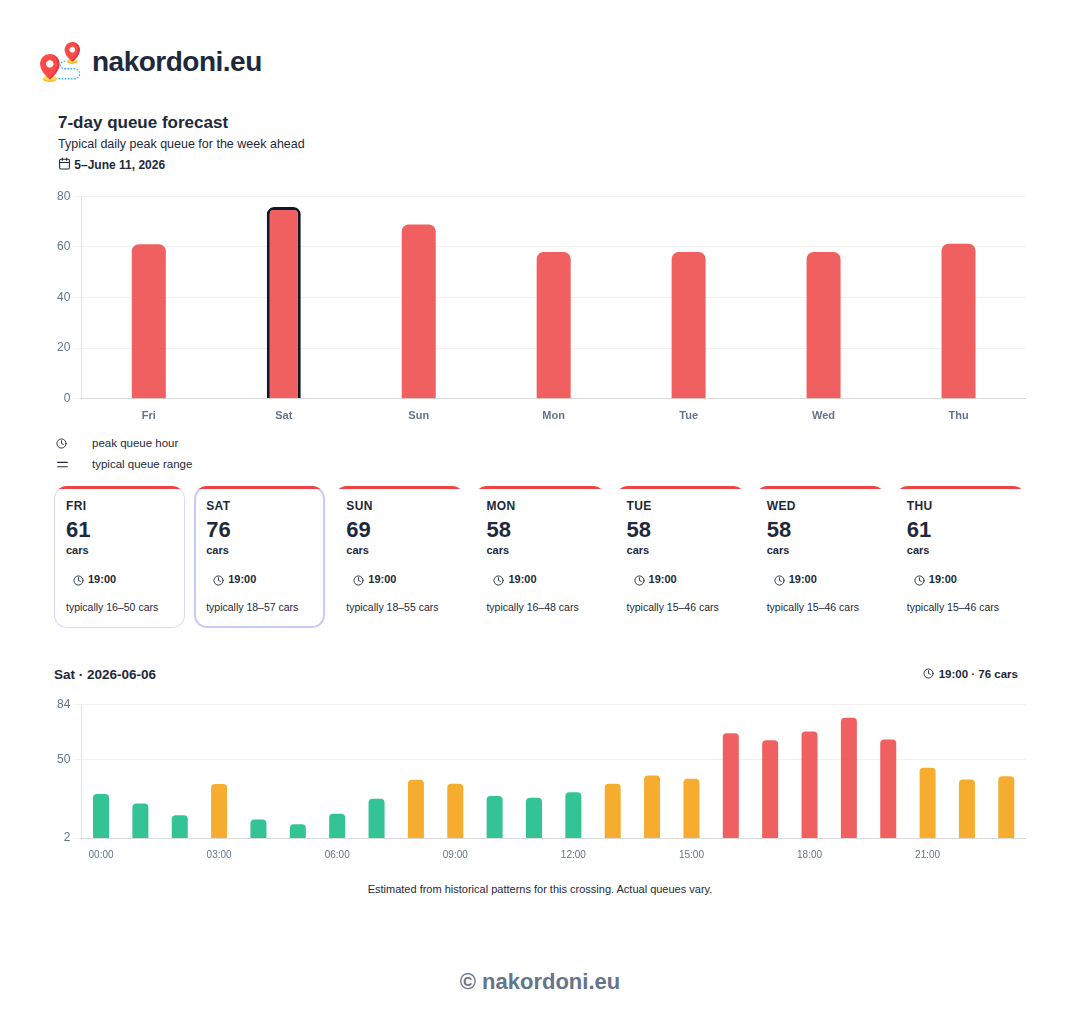
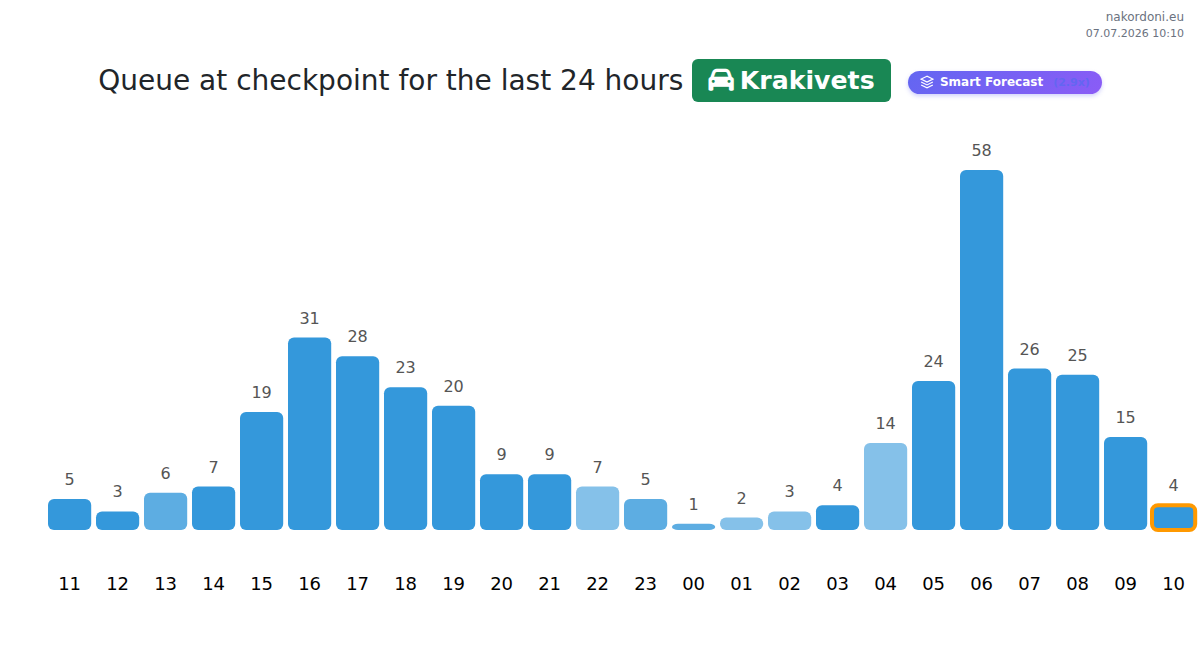
The same data products render the visuals on nakordoni.eu — weekly forecast charts, hourly queue profiles, live status cards. A taste of what the forecast and stats APIs contain:
Attribution
Explorer-plan integrations must show a visible "Data by nakordoni.eu" link wherever the data is displayed. It keeps the free plan free.
The exact code
Copy this snippet as-is. The link must stay indexable: a visible plain HTML <a href> next to the data that Google can index and follow — do NOT add rel="nofollow", rel="sponsored" or rel="ugc", and do not hide it with CSS. A link added by JavaScript is fine if it shows on the page Google renders (Developer API Terms v1.0, section 8.1).
<a href="https://nakordoni.eu/" title="Border queues, forecasts & statistics">Data by nakordoni.eu</a>
Compact small-print variant (e.g. under a chart or widget):
<p style="font-size:12px;margin:4px 0">
  Data by <a href="https://nakordoni.eu/">nakordoni.eu</a>
</p>
You may link to your language version instead, e.g. https://nakordoni.eu/pl/ — any visible plain HTML link to nakordoni.eu counts. The anchor text "Data by nakordoni.eu" must stay in English.
Where to place it
- Directly next to or under the data block (table, chart, widget, answer) — on the same screen, visible without extra clicks.
- On every page or app screen where our data appears — not only on an "about" page.
- Readable size and contrast: at least ~11px, not hidden, not collapsed, not the same color as the background.
- Native mobile apps without HTML links: show the text "Data by nakordoni.eu" on the data screen and put the tappable link on your info/about screen.
We periodically verify attribution on the "page where the data is used" you provided at signup. Missing or hidden attribution on the free Explorer plan leads to a reminder first, then key suspension. Customers on a paid plan may omit attribution.
Checks are made about once a week by our checker, whose user agent contains NakordoniComplianceBot/1.0. It opens only the pages listed in your developer dashboard, follows no other links and ignores robots.txt for those pages, because they are the ones you asked us to check. If bot protection or a firewall blocks unknown crawlers, allow this user agent — a page we cannot open is followed up by a ticket to you.
Data licence and markets
Your API key grants a licence to use our data in the countries you declared when you signed up, and only in those countries. We review every declaration before granting full access, because our data is our own product and we do not license it into markets without knowing where it will be published.
- Declare every country your site, app or product serves. You can change the list from your dashboard at any time; a change puts your account back into review.
- Until your markets are approved your key runs on reduced limits - half of the Starter plan allowance. This applies whatever plan you are on.
- We may approve only some of the countries you asked for. The approved list, not the requested one, is what your licence covers.
- Publishing or redistributing our data in a market you did not declare, or reselling it as a competing data feed, is a breach of these terms and can suspend your key without notice.
- Some plans are offered only in selected regions. Availability depends on the markets you declare.
- The full agreement is the Developer API Terms. It takes precedence over this summary; the English version is the binding one.
Data freshness
How current your data is depends on your plan. There is no per-response marker — every plan returns the same fields, the same types and the same response shape.
- Paid plans — Student, Starter, Pro and Pro MAX: live telemetry, no delay.
- Free Explorer plan: a snapshot from the last 15 to 30 minutes. The exact offset varies from request to request.
A delayed response is never an error and never a quota problem — it is a complete, valid response with older numbers in it. Retrying does not return newer data.
If your application needs current data, any paid plan returns real-time telemetry.
Updated